On the Tools menu, click Project Options and navigate to the Hyperview/.Dbdoc Options tab.

Selecting Use system settings for Home Page, Text Annotations, Live Loop Annotations, and Bookmarks allows some forms of "user data" to be included in the .dbdoc project file. In this way, a central "admin" can create bookmarks, home page, and annotations which are automatically available to all regular users of that dbdoc file.
This capability is new in DBDOC 11.6.
"User" vs "System" Hyperview
There is a new concept of "System" vs "User" Hyperview. The Hyperview launched by BuildPlus is considered to be the "System" Hyperview. All other Hyperviews are "User" Hyperviews. The idea is that the DBDOC admin who builds projects will naturally run the "System" Hyperview, since this is the one which is launched from BuildPlus after builds (and by launching from the BuildPlus toolbar).
If you, as the "System" user/admin, create bookmarks, text or live loop annotations, or a home page for the project viewed in this "System" Hyperview, and then rebuild the project, these user data files will be built into the subsequent build of the project file (in a manner analogous to built-in Live Loop Settings).
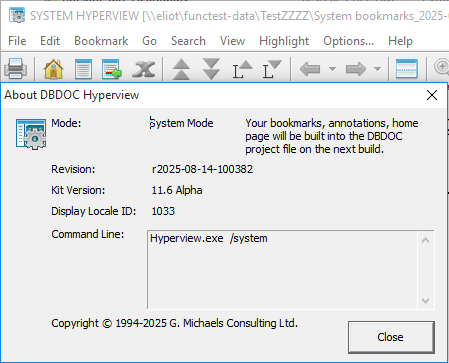
When you are in "System" Hyperview, a gear icon will be added on top of the regular Hyperview icons. This will be visible on the desktop toolbar, on the title bar of Hyperview (this will also show "SYSTEM HYPERVIEW" before your project name), and in the "About DBDOC Hyperview" dialog.
Types of "System" data
System annotations
Creating text or live loop annotations for a project viewed in "System" Hyperview and rebuilding the project will allow for copies of these annotations to show up for all users when they view the corresponding .dbdoc file. System annotations can be viewed in one place using the Annotation Manager in Hyperview. The System annotations will appear on documents in "User" Hyperview as cyan in colour, and are not able to be edited or deleted by users.
System bookmarks
If bookmarks are created for a project viewed in the "System" Hyperview, they will be built into the dbdoc file on the next build. Thereafter, they will appear in the Bookmarks menu of regular users viewing that dbdoc file. The user can choose to hide the System bookmarks, if desired.
System home page
If a home page is defined for a project viewed in the "System" Hyperview, it will be built into the dbdoc file. Regular users viewing the dbdoc file will have this home page automatically set. The user can override the System home page with a personal local home page if desired.
See also
- Specifying the project name and system file specifications
- Configuring a Project
- Resolving Duplicate File Choices
- Conductor NT or PPB Console associations
- Symbols-Graphics Association
- Database-Graphics Association
- Changing included databases
- Resolving non-accessible Path/File
- Categorizing SODG graphics
- Extracting an Operate IT Database for PPB
- Specifying configuration, graphics and other file locations with the Configuration Wizard
- Excluding some graphics files
- How 800xA ASSYST Files Folders are Associated with Databases
- How Symphony Plus/PGP Files Folders are Associated with Databases
- Building in AC 800M
- 800xA Graphics Chapters Selection
- Versions of configuration, graphics, third party tools, and other documentation supported by DBDOC