A USB dongle (security key) is required to run a build to completion with BuildPlus. A warning will appear if the dongle is not present when you start BuildPlus, and also if you get to the Hyperlink compile stage. The build will not continue and run Hyperlink until the dongle is present.
 Note:
Note:
- As of DBDOC 11.0, new Sentinel dongles are required. The old MicroDog dongles used with earlier versions of DBDOC will not work and BuildPlus will just give the License Issue warning shown here.
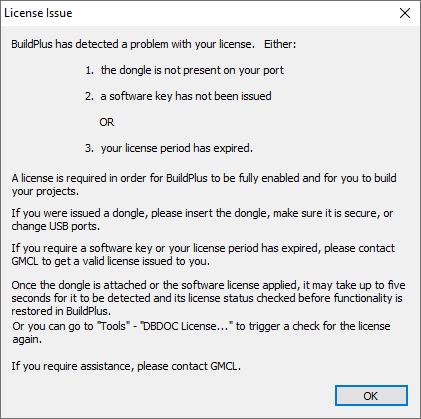
Please contact GMCL for assistance with dongle-related issues.
See also
- Overview of installing, updating, and administering DBDOC
- Operating system requirements and installation notes
- Working with the DBDOC security dongle
- Refreshing BuildPlus
- Using command line options
- Using a DBDOC license and computer key
- Running scheduled builds
- Customizing the BuildPlus user interface
- Running BuildPlus
- Exiting BuildPlus
- Opening BuildPlus
- Suppressing progress bars (Global option)
- WinMerge Open option (Global option)
- Sibling Projects (Global option)