Overview
Standard live loop annotation:

Standard live loop annotation with text data:

Live loop annotation with dynamic bar:

Live loop annotation with data specs:
 Note: As of DBDOC 11.1 this type of annotation has been replaced by Live Specs.
Live loop annotation with module status:

Live loop annotations are "sticky notes" displaying live data. You can add them to any document. You can create a live loop annotation to display live data or specs for any block in your system, or module status for any module. Live loop annotations are a convenient way to monitor block values, specs, or module status for one part of your system while looking at a different part of the system in Hyperview, or to display live data for just a few items on a document.
You can place live loop annotations on any document that you can view in Hyperview's content pane, including graphics, text files, and database entries. If you want to monitor live data independently of what document you happen to be viewing, consider using the Watch Window instead.
Live loop annotations are automatically saved, and will reappear on the documents where you created them the next time you open Hyperview, even if you switch to a new build of your system. So if you always need to refer to a certain block value while viewing a particular document in Hyperview, live loop annotations will let you do just that.
Use live loop annotations to:
- View live data for just one block in your system.
- Monitor live data from any Hyperview document.
- View the inputs to a function code by using live specs.
- View the live module status for any module in your system.
For example, you can easily use live loop annotations to keep track of the value of a tag, while viewing that tag's database entry.
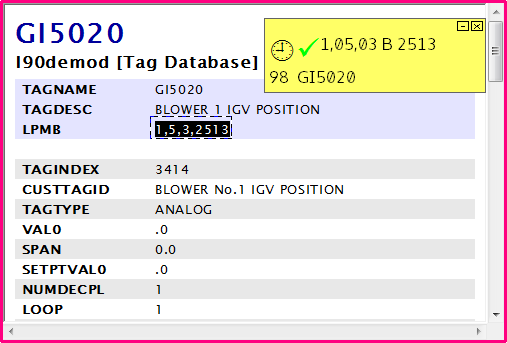
System live loop annotations:
New in DBDOC 11.6, "System" live loop annotations can be built into the DBDOC file and be distributed to all users viewing the DBDOC file.

Using and Interpreting Live Loop Annotations
Creating and Editing Live Loop Annotations
There are several different ways to create live loop annotations. See Creating live loop annotations and Live Data Options For This Block dialog for an explanation of the various options available.
Understanding the Text and Symbols on Live Loop Annotations
For details of the various fields and symbols displayed in a live loop annotation, see Interpreting text and symbols on live loop annotations.
Managing Live Loop Annotations
In order to see and edit all your live loop annotations in one place, use the Annotation Manager. This shows all your live loop annotations, lets you jump directly to any of them, and change options.
Frequency of Live Data Fetching
Live data is fetched from the CIUMON for display in a live loop annotation only when the annotation is visible on the display. If the Hyperview is minimized, data will not be fetched. The update interval for data updates can be set for each individual live loop annotation in the live loop annotation dialog.
Specifying Where Data is to be Fetched From
In all cases, live data is fetched from the connections (generally CIUMON) specified in the Live Loop Setup tab of the Options dialog.
System Live Loop Annotations
DBDOC 11.6 supports the ability to build centrally defined annotations into the dbdoc file -- "System" annotations. By default, these have a different color from the preexisting "User" annotations. System annotations can't be deleted by non-System users, but they can be minimized via the context menu, or by setting project options.
See Creating "System" Home Page, Text Annotations, Live Loop Annotations, and Bookmarks for information about creating System annotations.
See also
- Editing live loop annotations
- Creating live loop annotations
- Positioning live loop annotations
- Copying live loop annotations
- Deleting live loop annotations
- Interpreting text and symbols on live loop annotations
- Adding a live loop annotation to the watch window
- Changing the appearance of live loop annotations
- Finding a live loop annotation if you forget which document it is on
- Moving a live loop annotation to a different document
- Live Data Options For This Block dialog
- Managing live loop and text annotations in the Annotation Manager
- Importing live loop annotations