The Go To Source feature is a powerful and natural feature that allows you to jump directly to the source of a value in the configuration.
 Note: You can Go To Source from either a block hotspot or an input reference hotspot. From an input reference hotspot, Go To Source displays the corresponding output reference on a different CAD/CLD sheet.
There are four ways to use this feature:
- Double-click on a block input or line on a CAD or CLD diagram, block on a graphic, or any other block hotspot
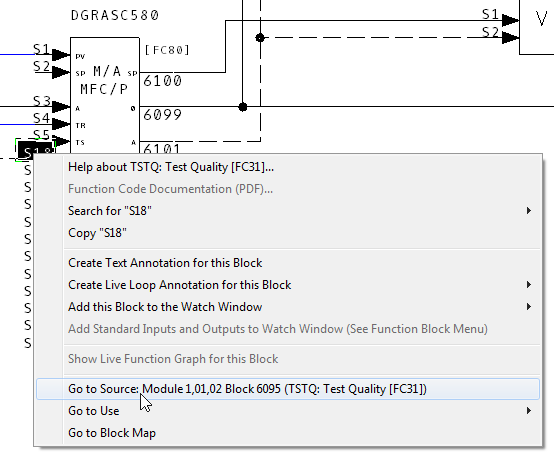
- Right-click on a block and choose Go To Source on the pop-up menu HyperView will automatically take you to the source of the input.
- Click on a block, then click on its source in the Index pane, which is always in red.
OR
- Click on Go To Source from the Block Menu in the Watch Window.
See also
- Clicking on hotspots in the content pane
- Going to a selected use of a value
- Double-clicking on hotspots
- Using Hotspots
- Navigation and Signal Tracing in Hyperview
- Signal Tracing
- Highlighting the signal lines associated with a block
- Showing the tree of ancestors for a block visually (Input Tree)
- Showing the tree of descendants for a block visually (Output Tree)
- Graphical Block Map
- Linking to Documents Outside the Watch Window
- Highlighting the signal lines associated with a block
- Showing the tree of ancestors for a block visually (Input Tree)
- Showing the tree of descendants for a block visually (Output Tree)